


In October, attackers got hold of a credential belonging to ConnectWise Cloud Backup, a backup service for Microsoft 365 that used to be called SkyKick. With it, they signed in to customers’ Microsoft 365 tenants as the backup app. Several of the company’s apps gave themselves administrator roles, mostly Exchange Administrator. In two tenants, one of them made itself Global Administrator and added credentials to other applications. ConnectWise disabled its app identities and suspended the service on 17 October.
Think about what a backup tool needs to do its job. To back up every mailbox, every OneDrive and every Teams chat, it has to be able to read all of them. That makes it one of the most powerful suppliers you have, and one of the least visible. Nobody logs in to it every day. It runs in the background, and on the supplier list it sits somewhere on page three.
When I audit supplier management, the supplier list is where I start, not where I stop. A list tells me who your suppliers are. It doesn’t tell me whether you thought about the risk before you bought, what you agreed, whether you still check on them, or whether their access went away when the contract did.
So in this issue: the five steps a supplier relationship goes through, what I ask to see at each one, and a check you can run on your own Microsoft 365 to find out where your supplier management stops.
A lifecycle, not a list
ISO 27001 has five Annex A controls on suppliers, 5.19 to 5.23. ISO/IEC 27002 explains them, and for the detail it points to the ISO/IEC 27036 series on supplier relationships. Part 2 follows a single supplier relationship through five processes: planning, supplier selection, the agreement, managing the relationship, and termination.
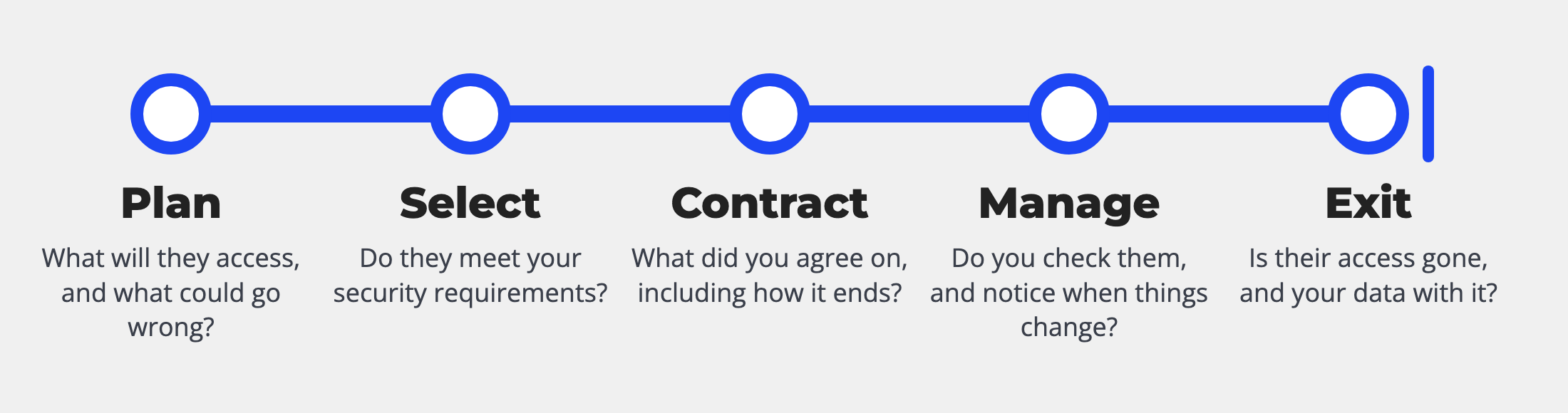
I find this the most useful way to look at supplier management, because it follows the supplier from the first idea to the last day. And a lot can go wrong between the steps: a risk nobody assessed before the purchase, a contract that says nothing about the end, an app that stays in your tenant long after the supplier has gone.
The other parts of the series go deeper on specific cases. Part 3 covers the supply chain for hardware, software and ICT services, and Part 4 covers cloud services, which is where a Microsoft 365 backup tool sits.
What I ask to see at each step
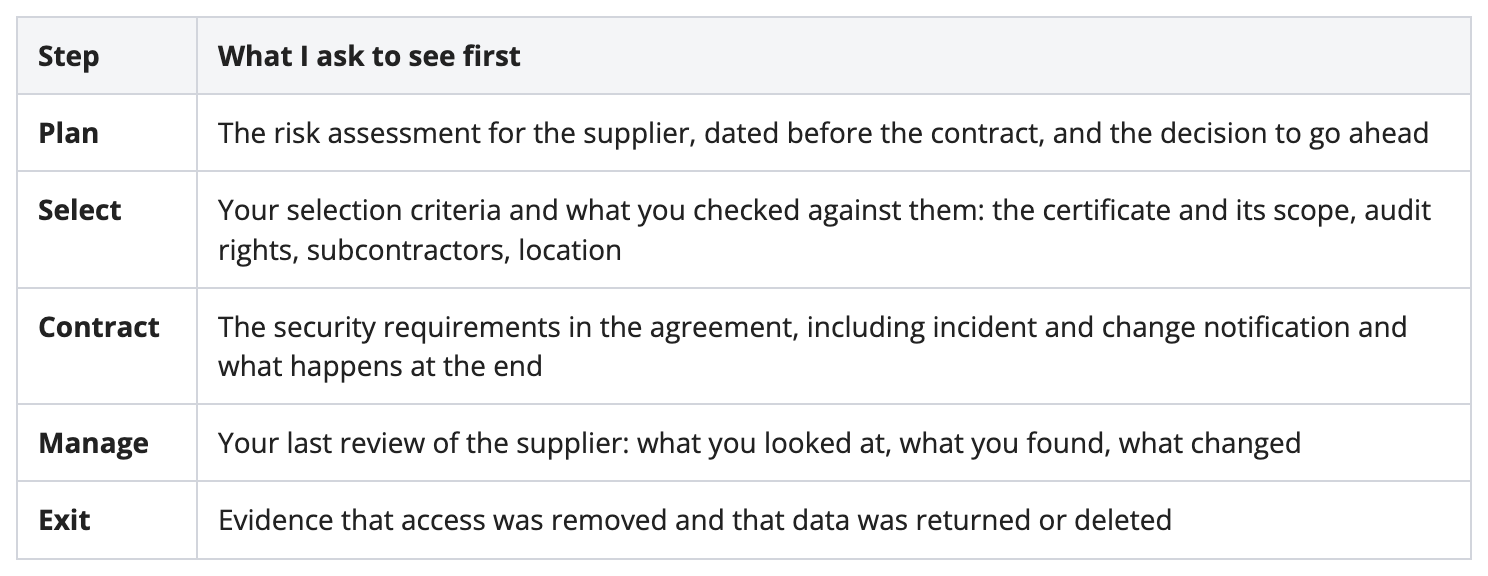
For each step, there’s one piece of evidence I usually ask for first:
Here’s what sits behind each one.
Plan. Everything later depends on this step. Before you buy, you should know what the supplier will be able to access and what could go wrong. ISO/IEC 27036-2 asks for a risk assessment, a documented decision by management, and minimum security requirements that come out of that assessment. It also says something that’s easy to forget: if you can’t bring the risk down to an acceptable level, don’t buy. When I audit this step, I take the newest supplier on your list and ask for its risk assessment. Then I look at the date. If it’s after the contract was signed, it wasn’t planning.
Select. This is where most organisations ask for the ISO 27001 certificate, and that’s a good start. But a certificate only helps if its scope covers the service you’re buying. Read the scope, check that it was issued by an accredited certification body, and check that it’s still valid. ISO/IEC 27036-2 lists more criteria than the certificate: whether the supplier lets you audit them, what assurance they give you on a regular basis, whether they use subcontractors, where they deliver the service from, and whether they accept your terms for the end of the relationship. My question here is simple: why this supplier, and what did you check?
Contract. Annex A 5.20 is about putting your security requirements into the agreement. The parts I look for first are the ones you’ll need when something goes wrong: how quickly the supplier tells you about an incident, whether they tell you before they change the service or bring in a subcontractor, whether you can audit them, and what happens when the contract ends. ISO/IEC 27036-2 wants the termination plan agreed at this step, not at the end. It sounds early, but it makes sense: once you’ve decided to leave, you have little leverage left. So I ask: where in the contract does it say how this ends?
Manage. This is the longest step, and the easiest one to let slide. Annex A 5.22 asks you to monitor, review and manage changes in your suppliers’ services. In practice, that means checking the certificate again when it’s renewed, reading the supplier’s assurance reports, looking at their incidents and how they handled them, and noticing when the service changes, for example a new subcontractor or an app asking for new permissions. How often you do this depends on the risk from the first step. A backup tool that can read every mailbox deserves more attention than the company that delivers your office supplies. My question: when did you last look at this supplier, and what did you find?
Exit. The last step is easy to forget, because nothing breaks when you skip it. ISO/IEC 27002 lists what a secure termination includes, starting with removing access rights, then handling and returning information and disposing of it securely. ISO/IEC 27036-2 expects a record showing that access was removed. For a cloud app, that means the user accounts, the API keys and the app’s permissions in your tenant. My question: show me a supplier you stopped using. Is its access gone?
One supplier, five steps: Barvello
To make it concrete, here’s how Barvello Coffee Systems, the fictional company I use in my ISO 27001 Lead Implementer course, handles the backup service for its Microsoft 365.
Before buying, the IT team noted that the service needs read access to every mailbox, OneDrive and Teams chat, rated the risk high, and got the CIO’s approval. The minimum requirements came straight out of that assessment: MFA on the supplier’s admin console, data stored in the EU, and incident notification within 24 hours.
Barvello compared two providers. The one it chose has an ISO 27001 certificate from an accredited body whose scope names the backup service, plus an independent assurance report on its controls. The contract contains the requirements, notification before new subcontractors, audit rights and an exit clause: Barvello’s data is deleted within 30 days of the end, with written confirmation, and the app is removed from the tenant.
Because the risk is high, the ISMS manager reviews this supplier every year: the certificate, the assurance report, any incidents, and the app’s permissions in Microsoft 365. The exit has an owner and a checklist, even though nobody plans to leave.
How to check your own Microsoft 365
You don’t need a tool for this, just access to the Microsoft Entra admin center. This is the order I’d go in:
Open Enterprise applications and change the filter to show all applications. Write down every app that doesn’t come from Microsoft.
For each app, open Permissions and look at what it was granted with admin consent. Anything that can read or write all mailboxes, all files or the directory belongs to a high-risk supplier.
Open Roles and administrators and check who holds Global Administrator and Exchange Administrator. If an application is on that list, find out why.
In the sign-in logs, look at the service principal sign-ins to see which apps are still in use. Keep in mind that the logs only go back a limited time, so no sign-in doesn’t prove an app is unused.
In the audit logs, filter for “Add service principal credentials”. Every new secret or certificate on an app should be one you or your supplier expected.
Now put that list next to your supplier register. An app with no supplier behind it means the first step never happened. An app from a supplier you stopped using means the last step never happened. Either way, you’ve found where your supplier management stops.
If you use ConnectWise Cloud Backup or SkyKick, follow the guidance from ConnectWise and Huntress as well. Disabling the apps isn’t enough on its own; credentials that were added to other apps stay until you remove them.
This Friday: Free Masterclass on Supplier Management
On Friday, November 13, at 3 PM CET (9 AM ET), I’m going live on GRCLab.
We’ll go through it step by step, and then you get to audit:
The five steps from ISO/IEC 27036-2, and how they connect to Annex A 5.19 to 5.23
What I ask to see at each step in an audit, and why
The Microsoft 365 check, step by step
A live workshop: together, we audit the supplier file of a fictional company and find where its supplier management stops
Bring your supplier list and your questions. There’s a live Q&A at the end, and it’s free.
See you on Friday, Aron
P.S. How many third-party apps did you find in your Microsoft 365? Just reply with the number. I read every reply.